An unfamiliar IP address is only a starting point when trying to identify something on a home or lab network. A hostname, an open service, or a web interface can make that address more useful. Network Devices brings those clues together in an Android app, with a local cache for results and custom names for devices you recognize.
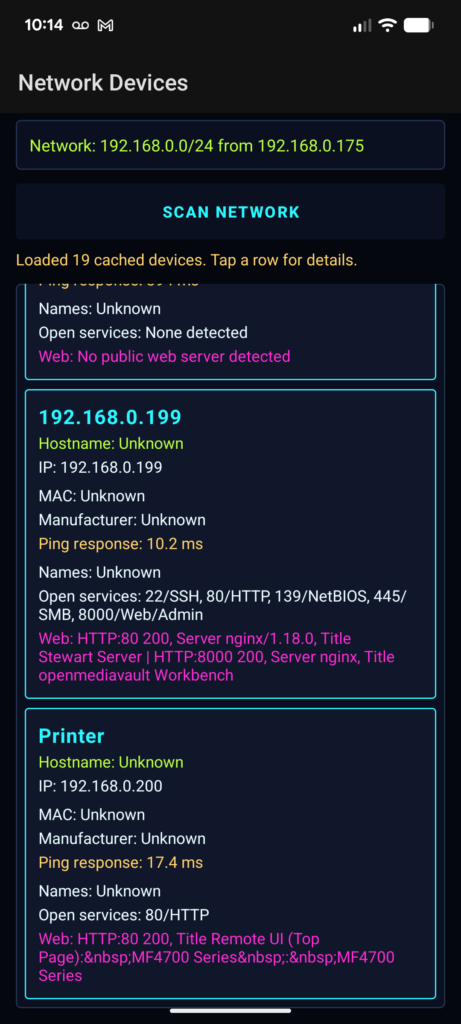
Starting with the current Wi-Fi connection
The main screen has a Scan Network button, a progress indicator, and a list of discovered devices. The scanner reads the phone’s Wi-Fi IPv4 address and uses its first three octets to construct a range of 254 hosts. For an address such as 192.168.1.42, it checks 192.168.1.1 through 192.168.1.254.
That is a fixed /24 assumption. The implementation does not calculate the range from the DHCP subnet mask, so its coverage can differ from the actual network on larger or smaller subnets. It also does not scan IPv6.
Scanning runs in background executors. A pool of 32 workers probes hosts, and completed results return to the activity for display. The list updates during the scan and stays sorted by the final octet of each IP address. Progress counts completed host probes, including addresses where nothing was found.
Combining several clues
Each host is checked with ping and connections to 14 common TCP ports. A successful ping or an open port is enough to include it in the results. This allows a host that ignores ping to appear when it accepts a connection on one of the selected ports.
The ports include conventional endpoints for SSH, Telnet, DNS, SMB, printing, and several web or administration interfaces. These service labels come from the port numbers. An open port 22 is labeled SSH without a protocol handshake to confirm what is running there.
For responding hosts, the scanner also attempts a reverse DNS lookup, a NetBIOS name query, and a MAC address lookup through /proc/net/arp. A small bundled prefix table supplies manufacturer names when a matching MAC address is available.
Those fields are useful clues with uneven availability. Android restrictions can prevent access to ARP information, the manufacturer table covers only selected prefixes, and devices may have no discoverable name. The interface keeps missing values visible as Unknown.
Looking for a web interface
A browser-accessible interface can be particularly useful for identifying a router, printer, or other network device. On selected open ports, Network Devices makes an HTTP or HTTPS request and collects the response status, server header, redirect destination, and page title when available.
The title reader examines an initial chunk of the response. Redirects are recorded without being followed, and a failed web request leaves an indication that the port is open. An open HTTPS port therefore does not guarantee that the app can retrieve the page successfully.
The device detail screen provides buttons that hand detected URLs to an external browser. These URLs are constructed from the address and port; the browser handles the subsequent interaction with the device.
Scanning itself generates network traffic, including web requests. It belongs on networks where you have permission to inspect the connected hosts.
Keeping recognizable names
Scan results are serialized as JSON in Android SharedPreferences. Reopening the app on the same subnet restores the cached list, and the detail screen lets you save a custom name. A later scan carries that name forward when it rediscovers the same IP address.
This makes naming convenient, but identity follows the address. If DHCP assigns that address to another device, the saved name can follow it. Network identity also uses only the /24 range: two separate Wi-Fi networks with the same range share a cache identity, while detecting a different range clears the previous cache.
The cache stores a snapshot rather than monitoring devices continuously. Detail screens read saved results, so the scan should finish before opening a newly discovered device for inspection.
Project Code
The code is available on GitHub.
GitHub repository: https://github.com/revnoah/NetworkDevices